For cabinetmakers, joiners and small workshops
From drawing to finished furniture.
Lay out a kitchen or a wardrobe on the room plan, or build a cabinet from boards. MizarCAD works out the dimensions, cutting, edge banding and drilling for you and prepares the data for production.
Nothing to install. No sign-up. The trial is one design without an account — when you create an account, the design moves into it.
Already have an account? Log in — your projects are in your account, not in the trial.
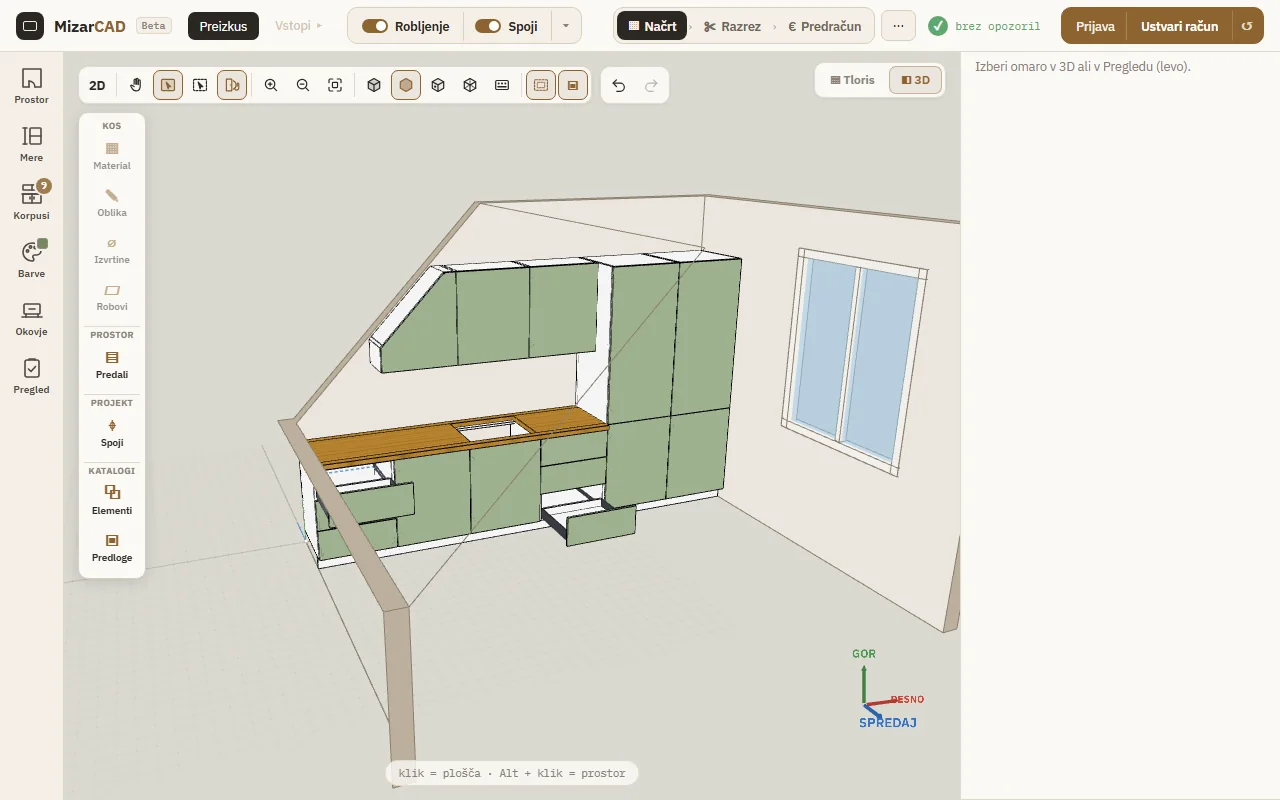
MizarCAD is in beta. The program interface is in English; you can change the language at any time in the bottom left corner.
How it works
- 3D viewplace cabinets along the walls of the room, or build a cabinet from boards.
- Dimensions, edging, drillingthe program derives them from the design as you go.
- Parts list and cuttingevery part with its dimensions, nested onto boards for the saw.
- CNC and productionjob sheets per station, labels, wall elevations for fitting and files for the machine.
Where to start?
Just a parts list? If you already have a parts list and only need the cutting plan, type or paste it into the free cutting list optimiser — you immediately see the number of boards, the yield and the metres of edging tape. No sign-up. Free cutting list optimiser →
Building for yourself? If you’re making a cabinet at home, in the garage or in the shed, draw it in 3D from boards and get a parts list for a panel cutting service or your own saw — no sign-up. Build your own chipboard cabinet →
Furniture design software — everything from one project
Free 3D furniture design software. Furniture planning here doesn’t stop at a picture: you draw once and the program derives everything else from the same design — and when a dimension changes, the cutting, edging and drilling change with it.
- Kitchen and wardrobe design in the room — the room on the floor plan at its real dimensions, with windows and doors; drag cabinets to the wall and they line up with their neighbours.
- Under slopes and stairs — the cabinet adapts its width by itself, and you choose how the top is finished.
- Wall elevations for fitting — plan and elevation of every wall with dimensions and heights from the floor, for the fitter and for the client.
- 3D furniture planning — enter a dimension once and everything derived from it recalculates.
- Parts list and cutting list — parts with finished and cutting sizes, nested onto boards with guillotine cuts in up to four stages.
- Edge banding — visible edges are worked out from how the boards meet and totalled in running metres per type of edging tape.
- Drilling and hardware — 32 mm system, hardware drilling, drawer runners, hinges and lift mechanisms in 3D.
- Costing and quotes — a price from your own material and labour rates, calculated from the cutting.
- Job sheets and documentation — saw and edgebander job sheets, work orders per station, part labels, assembly instructions, technical drawings and a client view.
- CNC exports — MPR, TCN, HOP, G-code, CNC DXF and drilling CSV (in final testing on machines).
Ready-made units
You don’t always have to start from an empty project. Kitchen unit, chest of drawers, cabinet with doors, tall cabinet and corner cabinet — built the way the program builds them: back panel in a groove, doors, drawers and shelves from the wizard, with hardware and drilling. Pick a unit, adjust the dimensions and add it to your project.
Pricing
Beta — 0 € during the beta. While the beta lasts, all features are free and we don’t collect any payment details. The prices below apply AFTER the beta.
Free — 0 €/month
core planning and project work (3D design, kitchens and wardrobes — up to 3 active, client view and wall elevations with the MizarCAD mark, parts list, cutting list with better nesting, edge banding, drilling and the 32 mm system with drilling CSV, shared hardware and decor catalogues, saw and edgebander job sheets, part labels, assembly instructions).
Pro — 29 €/month or 290 €/year
prices and quotes, unlimited kitchens and wardrobes, wall elevations and client view without the MizarCAD mark, DXF export and import, your own catalogues, component library, offcut rack, work orders for drilling and machining parts, folders and templates, combined cutting of several designs.
Pro+ — 69 €/month or 690 €/year
CNC exports (MPR, TCN, HOP, G-code, CNC DXF, drilling CSV), nesting and machine profiles; we set up your first machine profile together, with a calibration part.
Prices are excl. VAT and per workshop. The basic tier is free and stays free. Before anything becomes paid, we will let existing users know at least 30 days in advance; everyone then decides for themselves whether to pay or go back to the basic tier. Your designs stay yours either way.
Frequently asked questions
Can I try the program without signing up?
Yes. “Try it free” opens the full editor — 3D view, properties, the drawer wizard and the cutting list. You can start in an empty kitchen or wardrobe, with an empty cabinet or with a ready-made unit. The trial is one design without an account: it doesn’t show the projects you already have — if you have an account, log in. The design is edited on the server under a random session ID (no name or email address) and moves into your account when you create one.
What are a parts list and a cutting list, and how does MizarCAD calculate them?
The parts list is every part at its finished size; the cutting list is the same parts at their cutting sizes, nested onto boards. Each part is sized as “cutting size = finished size − edging thickness + 2 × trim allowance”, and the parts are nested with guillotine cuts in up to four stages, the way a panel saw can cut them.
Do I need to install anything?
No. MizarCAD runs in the browser — on Windows, Mac, Linux and tablets. There is no installation and no licence key tied to one computer; your designs are in the cloud and open wherever you log in.
How much does it cost and what is free?
During the beta all features are free — we don’t collect any payment details. The basic tier is and stays free (0 €/month): 3D design, kitchens and wardrobes (up to 3 active at a time), parts list, cutting list, edge banding, saw and edgebander job sheets, part labels, assembly instructions and a client view with the MizarCAD mark. Prices after the beta are PRO 29 €/month (290 €/year) and PRO+ 69 €/month (690 €/year); prices are excl. VAT and per workshop. Before anything becomes paid, we will let existing users know at least 30 days in advance.